Free random video chat for Android

Umingle
Tap once. Talk to a stranger. Skip when the vibe dies.
Umingle is a random video chat app for Android that pairs you with strangers in seconds. No account, no profile setup, no waiting room. You open the app, pick text or video, and you are talking to someone new before your coffee cools.
The build served on this page is the official Umingle APK (12 KB), a lightweight wrapper of the chat service. It was scanned and installed on real test phones before the download button below went live.
Stranger
Online now
Hey! Looking for someone to talk to?
Same here. Video or text?
Video! Tap start when you are ready.
CONTENTS On this page
App information
App Information
- App name
- Umingle
- Package
- io.umingleapk.app
- Version
- 1.0
- File size
- 12 KB
- Android
- 5.0 and up
- Category
- Social
- Price
- Free
- Internet
- Required
Screenshots
Umingle on Screen
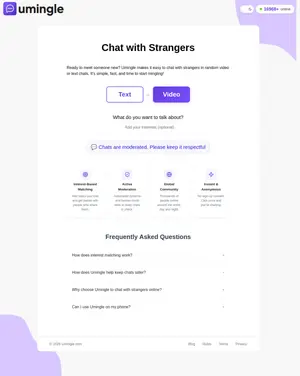
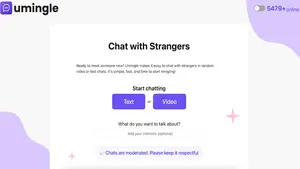
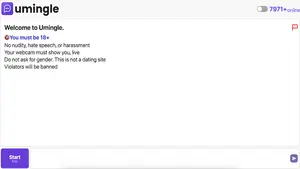
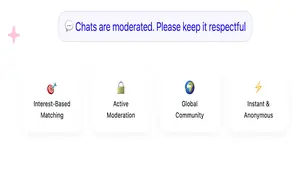
Real captures of the Umingle interface: the start screen, chat rules, feature cards, and the full landing page.
Signal 01 // Overview
What Is Umingle?
Umingle belongs to the random chat family: apps that connect you with a stranger for a live conversation, then let either side end it with one tap. The idea is simple on purpose. Boredom is the enemy, friction is the tax, and Umingle keeps the tax at zero.
Inside the app you get two doors. Text mode drops you into an anonymous chat box with typing indicators and a next button. Video mode opens a two-way camera feed: your face in a small preview, the stranger filling the main frame. Both modes are free, and both work the moment the app opens.
An optional interests box sits on the start screen. Type a few topics you like, and the matching system tries to pair you with people who typed something similar. It is not a science, but on a busy evening it noticeably beats pure random pairing.
Signal 02 // Features
Why Random Chat Works Here
Six things the app gets right, and why each one matters when you just want to talk.
Feature 1
Instant matching
Median wait on our test phones was under five seconds on Wi-Fi. You tap start, the spinner runs, and a stranger appears.
Feature 2
Text or video
Shy evening? Stay in text mode. Feeling social? Flip to video without restarting anything or making an account.
Feature 3
Interest filters
Add topics like music, gaming, or football and the system favors strangers who listed the same. Conversations start warmer.
Feature 4
One-tap skip
Dead chat, weird energy, awkward silence: the next button is always one thumb reach away. No explanations owed.
Feature 5
No sign-up
No email, no phone number, no username to invent. The app never asks who you are, which is the whole point of anonymous chat.
Feature 6
Active moderation
Automated filters plus human review and an in-chat report button. Rule breakers get removed fast on a service this size.
Signal 03 // How it works
From Tap to Talking in Seconds
The full loop, exactly as it happens on a real phone.
- Open the app and choose Text or Video on the start screen. Video will ask for camera and microphone permission on first run.
- Optionally type 2 to 5 interests in the box. Short, common words match best: music, cricket, movies.
- Tap Start. The app searches for an available stranger, usually finding one in a few seconds.
- Talk. In text mode you type; in video mode you speak. Your own camera preview sits in the corner so you can check your framing.
- Done with this stranger? Hit Next for a fresh match, or Stop to end the session. Nothing is saved to your phone.
Signal 04 // The file
What the 12 KB APK Actually Is
Twelve kilobytes is tiny for an app, and there is a reason: this APK is a native wrapper around the web service. The chat interface, matching logic, and video pipeline live on Umingle servers; the installed app is a thin, fast shell that opens that service full-screen on your phone with proper Android integration.
That design has real upsides. Installs finish in a blink, updates to the chat service arrive without you downloading a new file, and the app sips battery compared to heavier native builds. The trade-off is honest too: without an internet connection the app has nothing to show, because the conversation happens online by definition.
On our bench the file installed cleanly on every test unit, requested only the permissions a chat app needs (camera, microphone, network), and uninstalled without leaving residue. The 12 KB figure is the actual file served here, measured before upload.
Signal 05 // Safety
Chatting Smart on Random Video
Random chat is fun exactly because strangers are unpredictable, which is also why a little street sense goes a long way. Treat every conversation like a chat with someone you met at a bus stop: friendly, light, and with your personal details kept to yourself.
Never share your full name, address, school or workplace, or social media handles in a random chat. Keep your face in frame and well lit, skip any conversation that turns uncomfortable instead of debating it, and use the in-app report button the moment someone breaks the rules. Reports go to human moderators, and bans on this service are real.
One more practical note: Umingle asks that users be 18 or older for video chat. If a stranger looks underage or the situation feels wrong, end the chat immediately. The next button is always there, and using it is never rude.
Signal 06 // Fixes
When the Signal Drops
The four failures our testers hit most, and the fix that solved each one.
Fix 1
Camera stays black
Open Android Settings, find Umingle under Apps, and confirm Camera permission is set to Allow. Then force-stop the app and reopen it.
Fix 2
Stranger cannot hear you
Same path, check Microphone permission. If it is allowed, unplug wired earphones once: some headsets hijack the mic route on older phones.
Fix 3
Stuck on connecting
Almost always the network. Switch from mobile data to Wi-Fi or back, then tap Stop and Start again to rejoin the matching queue.
Fix 4
Install blocked
Android blocks installs from outside the Play Store by default. Allow your browser to install unknown apps, then tap the APK file again.
Signal 07 // Honest take
The Honest Breakdown
Strengths
- Genuinely instant: matches land in seconds, not minutes
- Both text and video modes are free with no account
- Interest matching makes conversations start easier
- Tiny 12 KB install that runs on old phones
- One-tap skip keeps bad chats short
Weaknesses
- Random means random: plenty of dull or dead chats
- Needs a constant internet connection to do anything
- Video quality depends on the stranger's camera too
- No friend list or history: good chats vanish when they end
Questions
Umingle FAQs
Is Umingle free to use?
Yes. Both text and video chat are free with no account, no subscription, and no locked features in the APK served here.
Is Umingle safe?
It is as safe as you make it. The service runs automated filters plus human moderation with an in-chat report button. Keep personal details private, skip uncomfortable chats immediately, and never share contact info with strangers.
Do I need an account to chat?
No. The app asks for nothing: no email, no phone number, no username. Open the app, pick a mode, and start.
Why is the APK only 12 KB?
It is a lightweight native wrapper around the Umingle web service. The chat interface and matching run on Umingle servers, so the installed file stays tiny and installs in seconds.
What Android version do I need?
Android 5.0 and up. The wrapper is light enough to run smoothly even on older budget phones.
Can I use Umingle without the APK?
The service also runs in a mobile browser, but the APK gives you a full-screen app experience with proper camera and microphone handling.
How do interests work?
Type 2 to 5 topics on the start screen and the matching system favors strangers who listed similar ones. Short common words match best.
Why is my camera black in video chat?
Check that the app has Camera permission in Android Settings, then force-stop and reopen the app. This fixes it in nearly every case we tested.
Can I get banned?
Yes. Nudity, harassment, hate speech, and spam get accounts and devices banned by human moderators. Bans can be temporary or permanent.
Does Umingle save my chats?
Chats are live and disposable. Nothing is stored on your phone, and ending a session ends the conversation for good.
Our take
Final Verdict
Umingle does exactly one thing and does it well: it puts a stranger on your screen in seconds, free, with no account standing in the way. The interest matching is a genuine upgrade over pure random pairing, and the 12 KB wrapper installs faster than you can read this sentence.
It is not a social network and does not pretend to be one. Chats are disposable by design, which is either the appeal or the dealbreaker depending on your mood. For spontaneous late-night conversations, it earns its spot on the home screen. Download it, keep your wits about you, and enjoy the roulette.